September 25, 2026 • Darius Mosley • 9 min reading time • Prices verified June 29, 2026
Wi-Fi 6 on a Budget: Entry Routers and Mesh for ISP Plans Under 1Gbps
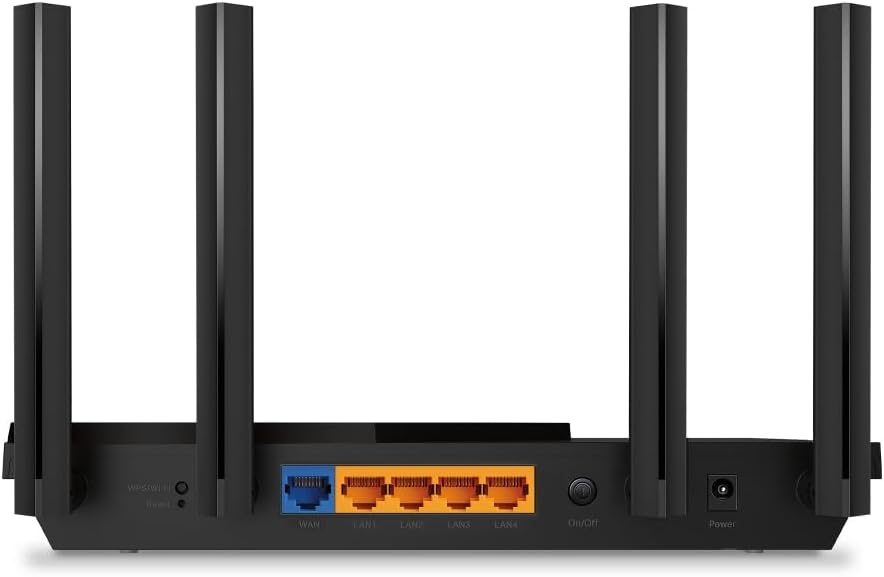
If your internet plan tops out somewhere between 100Mbps and 900Mbps — which is exactly where most cable and fiber-lite subscribers sit in mid-2026 — you don’t need a flagship router to get full value out of it. Wi-Fi 6 (the technical name is 802.11ax, the generation of wireless technology that became mainstream around 2020–2022) brought meaningful real-world improvements over the older Wi-Fi 5 standard: faster speeds when multiple devices are active at once, better battery life for phones and laptops because of a feature called Target Wake Time, and noticeably less congestion in dense environments like apartments. The good news is that those core benefits are present even in hardware that costs $80–$200. This guide is for the buyer who has decided to step off the ISP-supplied gateway — that plastic combo box your provider drops on your doorstep — and make a deliberate hardware decision, without overspending on capacity they won’t use.
After the on-ramp, we’ll get specific: which chipsets and radio configurations actually deliver at this tier, where manufacturers cut corners to hit price points, and how to decide between a single router and a two-node mesh system. The math is here. The tradeoffs are named explicitly.
| EDITOR'S PICKAmazon eero 6 mesh wifi system… | Mid-tierTP-Link Deco WiFi 6 Mesh System… | Budget pickTP-Link AX1800 WiFi 6 Router (A… | |
|---|---|---|---|
| Max plan speed | 500 Mbps | — | — |
| Coverage | 4,500 sq. ft. | 5,800 sq. ft. | — |
| Devices | 75+ | — | — |
| Units in pack | 3 | 3 | 1 |
| Ethernet ports | — | 6 | — |
| Price | $199.99 | $149.99 | $55.49 |
| See on Amazon → | See on Amazon → | See on Amazon → |
Why Sub-1Gbps Plans Still Benefit from a Deliberate Wi-Fi 6 Upgrade
This is worth stating clearly because it’s counterintuitive: your wireless bottleneck is almost never your ISP plan speed alone. On a 500Mbps cable plan, the real pain points are typically:
- Airtime congestion — your older Wi-Fi 5 router is scheduling transmissions inefficiently when 15–25 devices are active simultaneously (a realistic 2026 home count once you include phones, laptops, smart TVs, IoT sensors, and streaming sticks).
- Interference — Wi-Fi 5’s 5GHz radios are fighting the same channels as every neighbor’s gear, and older routers have no mechanism to stagger device wake cycles.
- Coverage edges — the ISP gateway is sitting wherever the coax or ONT port lands, not where it makes architectural sense.
Wi-Fi 6 addresses all three through OFDMA (a technique that lets one transmission serve multiple devices simultaneously rather than queuing them), BSS Coloring (a method of marking transmissions so nearby networks ignore each other instead of backing off), and the Target Wake Time scheduling mentioned above. Reviewers at Tom’s Guide and Ars Technica consistently find that the real-world throughput gains from Wi-Fi 6 in dense-device environments are more about efficiency than raw megabit numbers — which is exactly the argument for upgrading even when your ISP plan isn’t pushing multi-gig territory.
The practical implication: a well-chosen $120–$180 Wi-Fi 6 router will outperform a $250 Wi-Fi 5 router in a 20-device household, on a 400Mbps plan, every time. The generation gap matters more than the price gap at this tier.
What Gets Cut at the Budget End — and What Doesn’t Matter as Much as You Think
Budget Wi-Fi 6 hardware makes tradeoffs. Knowing which ones bite you and which ones don’t determines whether a $90 router is a bargain or a mistake.
Tradeoffs that rarely hurt sub-1Gbps buyers:
- 2×2 vs. 4×4 MIMO on 5GHz. MIMO refers to how many simultaneous antenna streams a radio can handle. Flagship routers run 4×4 or 8×8; budget models often run 2×2 or 2×2+2×2. For a client (your phone or laptop) that itself tops out at 2×2 — which is virtually every consumer device made before 2025 — a 2×2 AP radio is not the bottleneck. SmallNetBuilder’s benchmark analysis consistently shows that 2×2 AX radios deliver real-world 5GHz throughput well above 400Mbps in clean-signal conditions.
- Absence of a 6GHz radio. Wi-Fi 6E adds a third band in the 6GHz spectrum. On plans under 1Gbps, with current client device penetration still maturing in 2026, 6GHz is headroom you won’t fill. Save that money.
- Plastic enclosures and no active cooling. These routers run warm. Position them with airflow and they’re fine. Longevity concerns are real only in enclosed entertainment cabinets.
Tradeoffs that do hurt:
- Slow WAN ports. This is the site’s standing flag and it applies here too: some sub-$100 Wi-Fi 6 routers still ship with 100Mbps WAN ports. That’s a hardware ceiling below your ISP plan. Confirm the WAN port is Gigabit (1GbE) before purchasing. At sub-1Gbps plans you don’t need 2.5GbE WAN, but 1GbE is the floor. PCMag’s budget router reviews in 2025–2026 have flagged this on at least three models in the $70–$90 range.
- No VLAN or guest network isolation. If you run any smart home or IoT gear — and in 2026, most households do — you want the ability to segment that traffic onto a separate guest or IoT network. Budget routers from major brands (TP-Link Archer series, ASUS RT-AX series entry models) typically include basic VLAN/guest capability in their firmware. No-name or white-label hardware often doesn’t. Stick to named brands for this reason.
- Short firmware support windows. This is the factor buyers underweight most. A router that stops receiving security patches in 18 months is a liability, not an asset. Wirecutter’s router methodology (New York Times/Wirecutter best routers guide) explicitly weights long-term firmware support as a recommendation factor. TP-Link and ASUS have reasonably strong track records at the budget tier; Netgear’s sub-$150 models have a spottier history. Eero (Amazon-owned) delivers consistent firmware but limits advanced configuration.
By the Numbers: Budget Wi-Fi 6 Tier Snapshot
| Scenario | Format | Realistic Price (2026) | WAN Port to Confirm | Typical Limitation |
|---|---|---|---|---|
| Apartment / single-floor | Single router | $80–$150 | Must be 1GbE | Check firmware longevity |
| 2-story home, 1,500–2,500 sq ft | Single router (high-power) | $130–$200 | 1GbE or 2.5GbE | Coverage at edges |
| 2–3 story home, 2,500–4,000 sq ft | 2-node mesh | $150–$280 | Main node: 1GbE | Backhaul bandwidth cap |
| Larger home or tricky layout | 3-node mesh | $220–$380 | Main node: 1GbE | Per-node radio specs |
Single Router vs. Mesh: Making the Right Call for Your Square Footage
This is the decision most buyers get wrong by defaulting to mesh because it sounds modern. Mesh systems (multiple nodes that create one seamlessly roaming network) solve a specific problem: a single radio can’t cover the space effectively. They introduce a real cost: in budget-tier mesh, the inter-node communication (called the backhaul) typically runs on the same 5GHz radio band your devices use. That’s a shared-medium penalty. A device on a satellite node is getting maybe 40–60% of the throughput it would get connected directly to the main node, because the node is spending half its radio time talking to the router.
The decision rule:
-
Single floor, under ~1,800 sq ft, ISP plan under 500Mbps: A strong single router is the right answer. Spend $130–$170 on a quality AX1800 or AX3000 class router (the number refers to combined max theoretical throughput across all bands — treat it as a tier label, not a literal speed promise) and put it in a central location. Owners of TP-Link Archer AX55 and ASUS RT-AX58U class hardware consistently report clean coverage in these conditions across aggregated review threads on Tom’s Guide and PCMag.
-
Multi-floor or irregular layout, ISP plan 200–900Mbps: A two-node mesh starts making sense. Look for systems that advertise a dedicated backhaul — meaning the nodes have a third radio reserved just for node-to-node communication, rather than stealing from client-facing bands. In the $200–$280 range, Eero Pro 6 (now preceding the 6E, but still widely available and supported), TP-Link Deco XE75 at the low end of 6E pricing, and the older Orbi RBK353 occupy this space. Note that “tri-band” is not automatically synonymous with dedicated backhaul — verify in the spec sheet whether the third band is a dedicated backhaul or a third client-facing radio.
-
Wired backhaul as the budget power move: If your home has Ethernet runs between floors (or you’re willing to run a cable through a closet), a budget mesh with wired backhaul eliminates the shared-medium penalty entirely. Two TP-Link Deco M4 or AX3000-class nodes connected by Ethernet outperform most $350 wireless-only mesh systems on throughput to satellite nodes. Ars Technica’s mesh coverage consistently makes this point — wired backhaul is the most underrated upgrade available to the technically comfortable buyer.
Firmware Support and Ecosystem Lock-In: The Long-Game Decision
At the budget tier, ecosystem lock-in is less severe than in the prosumer space (you’re not committing to UniFi’s cloud controller or Omada’s site licensing model), but it’s not zero. Consider:
Eero: Firmware is automatic, consistent, and security patches arrive fast — Amazon’s ownership means serious cloud infrastructure. The ceiling is real: you can’t run VLANs in the traditional sense, can’t configure custom DNS per-SSID, can’t access the router via SSH. For a pure performance-and-coverage buyer, this is fine. For anyone who later wants to grow into home lab territory, Eero becomes a migration, not an upgrade.
TP-Link Deco: More configurability than Eero, app-centric management, adequate firmware cadence on popular models. The Deco line sits on a proprietary mesh stack — you can’t mix Deco nodes with Omada APs in the same mesh fabric, though both can coexist on the same network with separate management. If you think you might eventually add a managed switch or a separate AP, Omada (TP-Link’s prosumer line) is the longer runway. Starting on Deco and later moving to Omada requires a full replacement, not an upgrade.
ASUS RT-AX series: The most firmware-configurable option at this budget tier. AiMesh (ASUS’s multi-node system) allows mixing compatible ASUS models. Advanced users appreciate OpenVPN server built into the firmware, traffic monitoring, and QoS controls that actually work. The tradeoff: ASUS’s support lifecycle has historically dropped off around 3–4 years for budget models. Verify whether your target model is still receiving updates before buying.
The “If X, Then Y” Decision Frame
Pull these out when the choice is in front of you:
-
If your ISP plan is under 500Mbps and your home is one floor under 2,000 sq ft: Buy the best single AX1800–AX3000 router you can find from ASUS or TP-Link in the $100–$160 range. Don’t buy mesh you don’t need.
-
If your plan is 300–900Mbps and you have two or more floors: Budget two-node mesh at $180–$280, but only from a brand with a verifiable firmware support track record. Confirm 1GbE WAN. If you can wire the backhaul, do it — it outperforms every wireless alternative at the price.
-
If you’re even slightly interested in VLANs, a home lab, or managed switching in the next 2–3 years: Don’t start on Eero. Start on ASUS AiMesh or TP-Link Deco, or skip directly to a single TP-Link Omada EAP access point with a soft controller — it’s not much more money and the learning curve pays back quickly.
-
If any router you’re considering has a 100Mbps WAN port, or a firmware release history that stops before 2024: Walk away. The spec sheet savings are real; the regret is also real.
The core principle at this tier is deceptively simple: Wi-Fi 6’s efficiency gains are real and meaningful even on modest plans, the hardware to capture them is genuinely affordable in 2026, and the variables that separate a good purchase from a frustrating one are WAN port speed, firmware longevity, and honest assessment of whether your square footage needs one node or two.